
NetTalk Service Only Internet Phone Service Installation Guide

NetTalk Service Only Internet Phone Service Installation Guide explains how to download, install, and log in on Windows XP, Vista, and Windows 7.
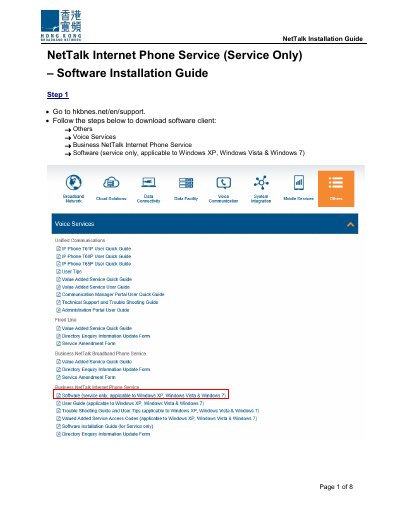

NetTalk Service Only Internet Phone Service Installation Guide - cover page
Brand
NetTalk
Category
phone software
Document type
Installation Guide
Language
English
Pages
8
File format
PDF
File size
625 KB
Published
17 November, 2026
Updated
17 November, 2026
MD5 checksum
531B68F97ED0DBEF859629E0242BD645

About this manual

This guide provides step-by-step instructions for downloading and installing the NetTalk Internet Phone Service software client. It covers saving the installer, running the setup, accessing the program from the Start Menu, and logging in with a user ID and password.

What's inside

  • Download software client
  • Save installation file
  • Open downloaded folder
  • Run installer and finish setup
  • Access NetTalk from Start Menu
  • Login to start service
  • First Time Service Activation remarks

Specifications

Operating SystemWindows XP, Windows Vista & Windows 7

Frequently asked questions

Which Windows operating systems are supported?

The software applies to Windows XP, Windows Vista, and Windows 7.

Where can the NetTalk software client be downloaded?

Go to hkbnes.net/en/support and follow the download steps for Business NetTalk Internet Phone Service software.

Is First Time Service Activation required for Business users?

No, First Time Service Activation is not required for Business users.

How do you access NetTalk after installation?

Access NetTalk from Start Menu by selecting All programs, then NetTalk, then Nettalk.

Download PDF (625 KB)

More NetTalk Manuals


View all NetTalk manuals →