
Mont Blanc CAD-713 amplifier quick programming guide covering connections, automatic setup, filters, and remote power control.
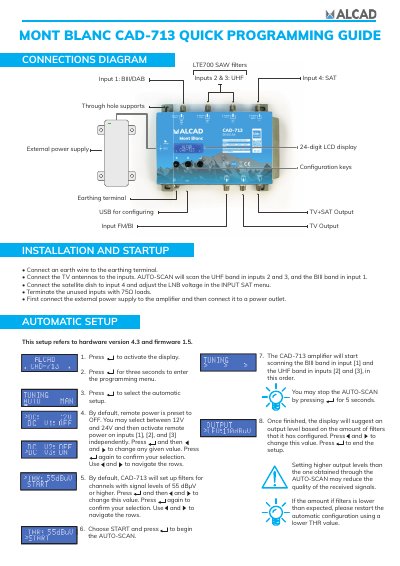
This Mont Blanc CAD-713 quick programming guide describes installation and startup automatic setup for the CAD-713 amplifier. It covers the connections diagram, configuration keys, and the 24-digit LCD display for hardware version 4.3 and firmware 1.5.
The guide explains how to connect antennas and a satellite dish, run the AUTO-SCAN on BIII and UHF inputs, set filter thresholds, and adjust 12V or 24V remote power on selected inputs.
| Hardware version | 4.3 |
|---|---|
| Display | 24-digit LCD |
| Input 1 band | BIII/DAB |
| Inputs 2 and 3 band | UHF |
| Input 4 band | SAT |
| Default filter signal level | 55 dBµV or higher |
| Remote power options | 12V and 24V |
| Unused input termination | 75Ω loads |
| AUTO-SCAN stop time | 5 seconds |
Press for three seconds to enter the programming menu.
You may select between 12V and 24V.
Stop the AUTO-SCAN by pressing for 5 seconds.