
The Minn Kota Ulterra Trolling Motor User Manual provides operating instructions, foot pedal functions, power procedures, and safety warnings.
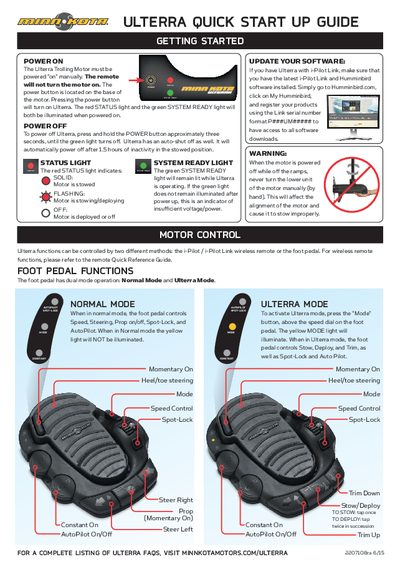
This manual explains how to control the Ulterra trolling motor using either the i‑Pilot/i‑Pilot Link wireless remote or the foot pedal. It details the two pedal modes—Ulterra Mode and Normal Mode—and the functions each mode provides, such as stow, deploy, trim, Spot‑Lock, and AutoPilot.
It also covers power‑on and power‑off procedures, status indicators, software update guidance, and important safety warnings. The motor must be turned on manually via the power button on its base, and it will automatically shut off after 1.5 hours of inactivity when stowed.
| Auto shut‑off time | 1.5 hours of inactivity in stowed position |
|---|---|
| Power button location | Base of the motor |
| Status light colors | Red for status, green for system ready |
| Status light colors | Red for status, green for system ready |
Press the power button on the base of the motor; the red STATUS light and green SYSTEM READY light will illuminate.
Press the Mode button above the speed dial on the pedal; the yellow MODE light will illuminate.
A solid red light means the motor is stowed; flashing indicates it is stowing or deploying; off means the motor is deployed or off.
Yes, it will automatically power off after 1.5 hours of inactivity while in the stowed position.