
This manual provides instructions for configuring the Minicom terminal emulator, setting serial port parameters, saving setups, and testing AT commands.
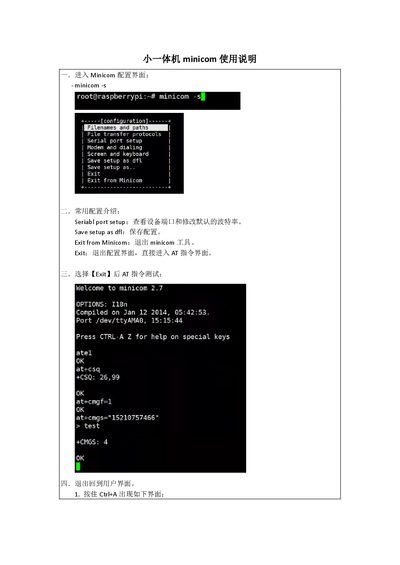
The document serves as a usage guide for the Minicom software tool. It explains how to access the configuration interface using the command line and lists the available menu options such as transfer protocols, serial port setup, modem settings, and screen/keyboard configurations.
Key operational steps include viewing or modifying baud rates in the serial port setup, saving current configurations, and exiting the tool. The guide also details how to enter the AT command interface after exiting the main configuration menu to test specific commands like SMS sending. This manual is written in Chinese.
Press Exit to leave the configuration menu, which directly enters the AT command interface.
Select the option 'Save setup as df' within the configuration menu.