
Recommended procedure for qualified electricians to set up a Mercedes-Benz Energy Storage Home with an SMA Sunny Island inverter.
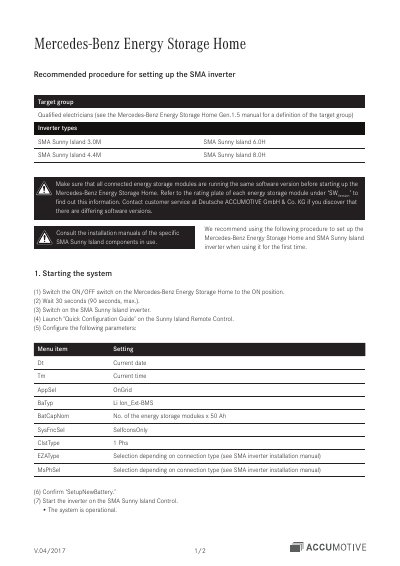
This document describes the recommended procedure for setting up the Mercedes-Benz Energy Storage Home together with an SMA Sunny Island inverter when the system is used for the first time. It is aimed at qualified electricians, and the installation manuals of the specific SMA Sunny Island components in use should also be consulted. The inverter types covered are SMA Sunny Island 3.0M, 6.0H, 4.4M and 8.0H.
The guide walks through starting the system and entering parameters in the 'Quick Configuration Guide' on the Sunny Island Remote Control, setting operating parameters in 'Expert mode', capturing data to an SD card for troubleshooting, manually charging the storage modules, and finally showing the end customer how to switch on the inverter.
| Supported inverter types | SMA Sunny Island 3.0M, 6.0H, 4.4M, 8.0H |
|---|---|
| Target group | Qualified electricians |
| Battery type setting (BaTyp) | Li Ion_Ext-BMS |
| Nominal battery capacity setting (BatCapNom) | Number of energy storage modules x 50 Ah |
| Manual charging target state of charge | Around 75–80% SoC |
| Standby time after manual charging | 24 hours |
| Minimum self-consumption state of charge (262#05 MinSlfCsmpSOC) | 70% |
Switch the ON/OFF switch on the storage system to ON, wait 30 seconds (90 seconds maximum), then switch on the SMA Sunny Island inverter and launch the 'Quick Configuration Guide' on the Sunny Island Remote Control.
The battery type parameter BaTyp is set to Li Ion_Ext-BMS.
Make sure all connected modules run the same software version, checked under 'SW Version' on each rating plate, and contact customer service at Deutsche ACCUMOTIVE GmbH & Co. KG if versions differ.
Insert an SD card into the SMA Sunny Island Remote Control, switch to 'Expert mode', and set the '550#03 CardFunc' menu item to 'StoHis'.