
Mercedes-Benz Bluetooth External Pairing User Manual

Instructions for connecting a mobile phone to the Mercedes-Benz hands-free system via Bluetooth external pairing, specifically for Samsung Note5.
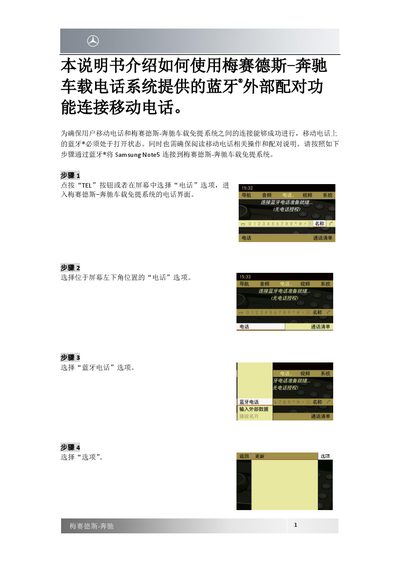

Mercedes-Benz Bluetooth External Pairing User Manual - cover page
Brand
Mercedes-Benz
Category
Car
Document type
User Manual
Language
Chinese
Pages
3
File format
PDF
File size
468 KB
Published
13 October, 2026
Updated
13 October, 2026
MD5 checksum
1B173DACD600DAF226CEE53C6BD96A54

About this manual

This manual explains how to use the Bluetooth external pairing function of the Mercedes-Benz hands-free system to connect a mobile phone. It ensures a successful connection between the mobile phone and the vehicle system by requiring Bluetooth to be enabled on the phone. The guide details the specific steps for pairing a Samsung Note5 with the vehicle system. This manual is written in Chinese.

What's inside

  • Introduction
  • Step 1: Enter Phone Interface
  • Step 2: Select Bluetooth Phone
  • Step 3: Select Options
  • Step 4: Select External Authorization
  • Step 5: Confirm Authorization on Phone
  • Step 6: Enter Password on Vehicle System
  • Step 7: Confirm Password on Phone
  • Step 8: Grant Access Permissions

Frequently asked questions

What is required to connect a mobile phone via Bluetooth?

The Bluetooth function on the mobile phone must be turned on.

How do I confirm the authorization for a Samsung Note5?

Select 'Yes' to confirm authorization for the Samsung Note5 on the vehicle system.

What password length is required for the connection?

The password length must be between 4 and 25 digits.

Download PDF (468 KB)

More Mercedes-Benz Manuals


View all Mercedes-Benz manuals →