
Control guide for the MB512 left and right panels, explaining projector, side screen, source selection, audio, and big screen buttons.
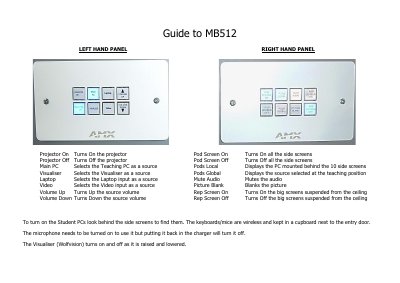
This guide describes the functions of the MB512 left hand and right hand control panels. The left panel covers the projector, pod screens, main PC, visualiser, laptop, and video sources, while the right panel covers audio mute and volume, picture blanking, and the rep screens suspended from the ceiling.
The guide also includes practical notes for the room: student PCs are switched on behind the side screens, wireless keyboards and mice are stored in a cupboard next to the entry door, the microphone must be turned on manually and switches off when returned to its charger, and the Wolfvision visualiser powers on and off as it is raised and lowered.
Look behind the side screens to find the Student PCs and turn them on there.
They are kept in a cupboard next to the entry door.
The microphone needs to be turned on to use it, and putting it back in the charger turns it off.
The Wolfvision Visualiser turns on and off automatically as it is raised and lowered.