
Luhao V2.8 vending machine user manual covering mainboard buttons, DIP switches, sensor sensitivity, machine settings, menus, status codes, and fault codes.
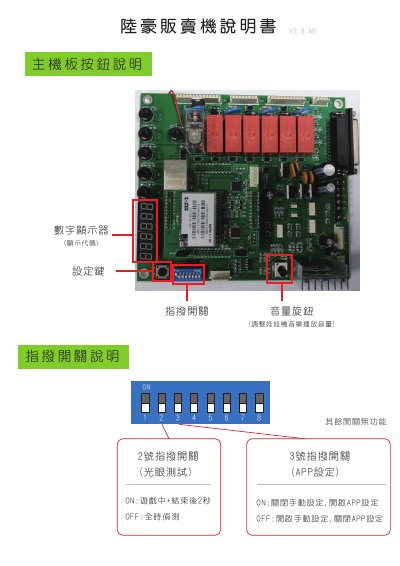
This manual describes the Luhao V2.8 vending machine, including mainboard buttons, DIP switch settings, and photoelectric eye sensitivity adjustment. It explains how to operate the setting key, volume knob, and numeric display.
It covers the setting menu, game parameters, motor speeds, grip force values, account queries, system tests, and fault codes E0 through E7. This manual is written in Chinese.
Turn the VR knob clockwise to make the sensor less sensitive, or counterclockwise to make it more sensitive.
It indicates that the machine is in manual setting mode.
It indicates a photoelectric eye failure.
Press the setting key once to enter machine settings.