
User manual for the Lion Power DH48A1 controller covering features, wiring, settings and troubleshooting.
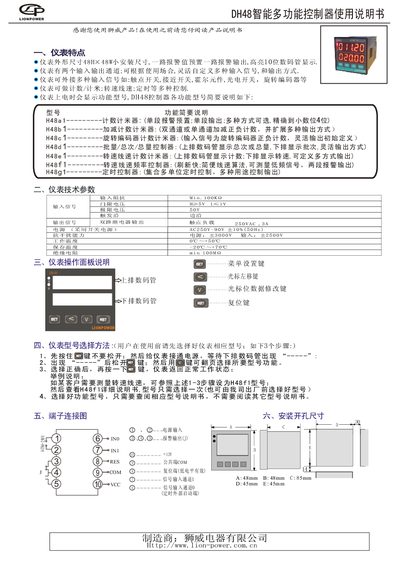
The DH48A1 is a compact 48 mm × 48 mm controller that can count, measure distance, speed, timing and batch totals. It supports a variety of input signals such as contact switches, proximity switches, Hall sensors, photo‑electric switches and rotary encoders, and provides flexible alarm and output options.
The manual explains how to select the appropriate model, configure parameters, connect terminals, and resolve common issues. Detailed wiring diagrams and menu operation instructions are provided for each functional variant of the DH48 series. This manual is written in Chinese.
| Dimensions | 48 mm H × 48 mm W |
|---|---|
| Input Impedance | ≥100 kΩ |
| Power Supply | 250 VAC, 3 A |
| Insulation Resistance | ≥100 kΩ |
Hold the button while powering on, wait for the dashes on the upper display, release the button, then use the button to scroll through the model list and press it again to confirm the selection.
Short‑press the button to enter alarm‑value setting mode; long‑press the button to enter parameter setting mode, then use the cursor keys to adjust the alarm threshold within the displayed range.
Verify that the wiring is correct, the counting ratio is not set too low, and the external reset terminal is not permanently active. Also ensure the counting speed is set appropriately for the input signal frequency.