
This guide covers safety precautions, ribbon and label installation, driver setup, and software configuration for LEDEN barcode printers.
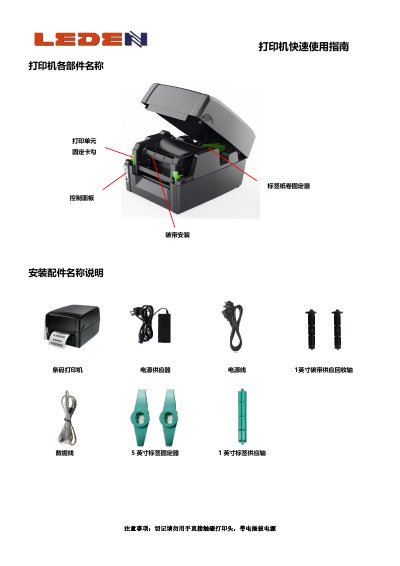
This document serves as a quick user guide for LEDEN barcode printers. It provides essential safety warnings, such as avoiding direct contact with the print head and not plugging/unplugging power while the device is on. The guide details the physical components of the printer and explains the step-by-step procedures for installing the carbon ribbon and various types of labels. This manual is written in Chinese.
Do not touch the print head directly with your hands, and do not plug or unplug the power cord while the printer is powered on.
It takes approximately 30 seconds to remove the driver by selecting the printer model and clicking remove.
The default resolution setting is 203dpi when opening the software to create a new label.