
JVC GZ-HM650/GZ-HM670/GZ-HM445/GZ-HM448 Blu-ray Recorder Connection Guide

Instructions for connecting a JVC Blu-ray recorder via USB to record discs and power on the device.
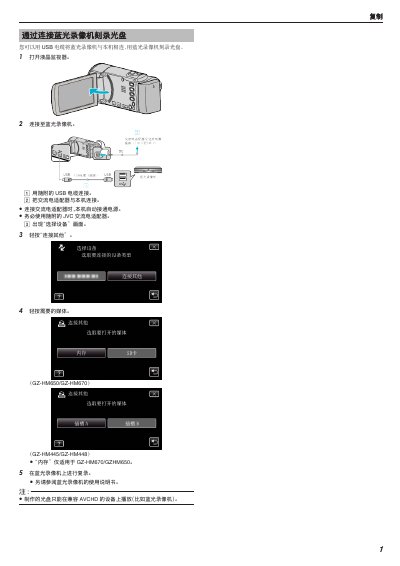

JVC GZ-HM650/GZ-HM670/GZ-HM445/GZ-HM448 Blu-ray Recorder Connection Guide - cover page
Brand
JVC
Category
Digital Video Recorder
Document type
User Manual
Language
Chinese
Pages
1
File format
PDF
File size
170 KB
Published
16 October, 2026
Updated
16 October, 2026
MD5 checksum
B5EF6FB27DED8BCD6BFA7E6E3028667D

About this manual

This guide explains how to connect a JVC Blu-ray recorder to a compatible device using the supplied USB cable. It details the steps to link the recorder to the main unit and power it on using the included AC adapter. This manual is written in Chinese.

What's inside

  • Connecting via USB
  • Power Connection
  • Selecting Device
  • Media Selection
  • Recording
  • Notes

Frequently asked questions

What voltage range does the AC adapter support?

The AC adapter supports a voltage range of 100 V to 240 V.

Which USB cable should be used for connection?

You must use the supplied JVC USB cable for connection.

Download PDF (170 KB)

More JVC Manuals


View all JVC manuals →