
JVC DR-MV5S Remote Control and DVD/VCR Unit Quick Start Guide

This quick start guide covers connecting the JVC DR-MV5S to a TV, setting up the remote control with batteries, and performing basic recording and dubbing…
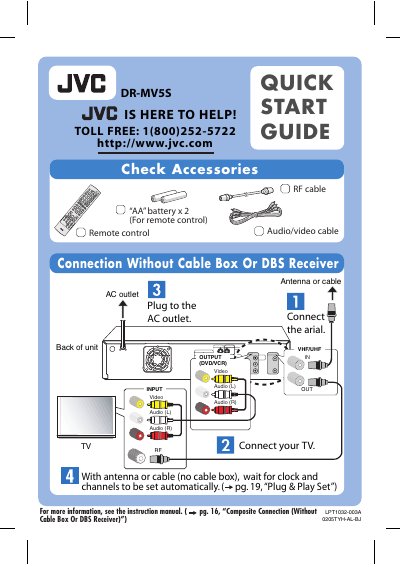

JVC DR-MV5S Remote Control and DVD/VCR Unit Quick Start Guide - cover page
Brand
JVC
Document type
Quick Start Guide
Language
English
Pages
4
File format
PDF
File size
563 KB
Published
16 October, 2026
Updated
16 October, 2026
MD5 checksum
B78562E217BEF22FFBB7F84D11594172

About this manual

The document provides instructions for connecting the JVC DR-MV5S unit to a television using various methods, including direct connection without a cable box or DBS receiver, as well as connections involving external receivers. It details how to plug in the antenna or cable and connect audio/video cables to the back of the unit.

What's inside

  • Connection Without Cable Box
  • Connection With Cable Box Or DBS Receiver
  • Component Video Connection
  • Basic Recording
  • Basic Playback
  • Dubbing

Frequently asked questions

What batteries are required for the remote control?

The remote control requires two AA batteries.

How many times can a DVD-RW disc be rewritten?

A DVD-RW disc can be rewritten 100,000 times.

How many times can a DVD-RAM disc be rewritten?

A DVD-RAM disc can be rewritten 1,000 times.

Download PDF (563 KB)

More JVC Manuals


View all JVC manuals →