
Johnson 1435-1000D digital torpedo level operator's manual with battery setup, unit modes, backlight, custom angles, two-point calibration and specifications.
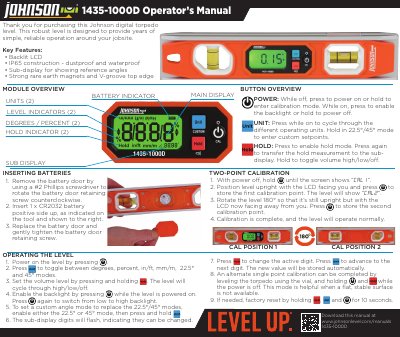
This operator's manual covers the Johnson 1435-1000D digital torpedo level. It explains inserting the CR2032 battery, powering the level on and off, switching units, setting volume and backlight, and using the hold function.
The manual also describes setting custom 22.5°/45° angles, single-point and two-point calibration, factory reset, troubleshooting, common applications, warranty and registration information, and lists the level's specifications.
| Accuracy | ±0.1° at 0°/90°; 0.2° other angles |
|---|---|
| Battery | 1 x CR2032, up to 16 hrs |
| Units | Degree, Percent, in/ft, mm/m |
| Backlight | Two-stage with timer |
| Operating Temperature | 14°F - 122°F |
| Weight, Dimensions and IP Rating | 8 oz, 10” x 2” x 3/4”, IP65 |
It uses one CR2032 battery, inserted with the positive side up as indicated on the tool.
With the power off, hold the power button until the screen shows “CAL1 ”, then press to store the first point, rotate the level 180°, and press to store the second point.
The backlight automatically times out after about 20 seconds in a stationary position; move the level slightly to reactivate it.
Press the UNIT button while the level is on to cycle through the different operating units.