
User manual for HyperX Clutch wireless gaming controller covering setup, mode selection, pairing, and usage instructions in multiple languages.
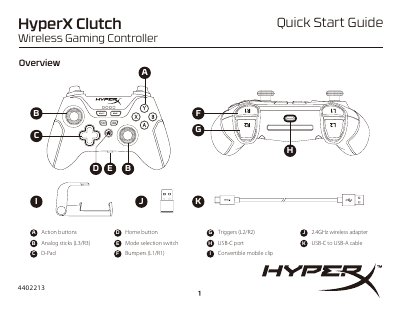
This manual provides step-by-step instructions for setting up and using the HyperX Clutch Wireless Gaming Controller. It covers how to charge the controller, select between 2.4G and Bluetooth modes, pair with devices, and use the mobile clip for handheld or tabletop modes. The guide is available in multiple languages including English, French, Italian, German, Polish, Spanish, Portuguese, Czech, and Russian.
The controller features action buttons, analog sticks, D-pad, bumpers, triggers, and a USB-C port. It automatically turns off after 5 minutes of inactivity. Support is available via the HyperX website for configuration or usage questions.
It is recommended to fully charge the controller before first use.
Set the mode switch to Bluetooth, press and hold the Home button for 6 seconds until the LEDs flash rapidly indicating pairing mode, then search for "HyperX Clutch" on your Bluetooth-enabled device.
The controller automatically turns off after 5 minutes of inactivity.