
Step-by-step installation guide for HP PSC 2100 series all-in-one printer, including software, cover, paper, power, language, ink cartridges, and alignment.
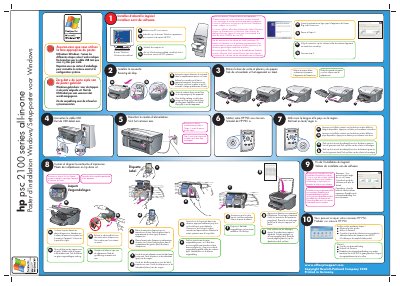
This manual provides instructions for installing the HP PSC 2100 series all-in-one printer. It covers connecting the device, installing software, attaching the cover, loading paper, connecting USB and power cables, setting language and region, installing ink cartridges, and performing printer alignment. The guide includes both French and Dutch instructions for users in different regions. It also advises users to complete the product registration form and consult the reference manual for additional usage options. This manual is written in French.
Install the software first by inserting the HP PSC CD-ROM.
Do not connect the USB cable until instructed to do so.
You can try your new HP PSC.