
This user guide provides instructions for setting up, using, and troubleshooting the HP DeskJet 3700 All-in-One printer series.
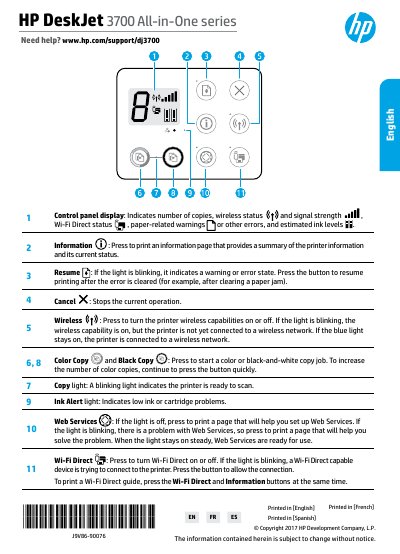
The document serves as a comprehensive user manual for the HP DeskJet 3700 All-in-One Printer Series. It covers control panel functions, wireless setup procedures including Wi-Fi Direct, and provides basic troubleshooting steps for common issues like paper jams or low ink alerts.
Additionally, the guide includes information on printer registration, warranty terms, and safety precautions. It specifies that the product is designed for use in open environments such as homes and notes specific regulatory model numbers.
The Ink Alert light indicates low ink or cartridge problems.