
Instructions for safely removing and replacing memory modules in an HP computer, including compatibility requirements and troubleshooting.
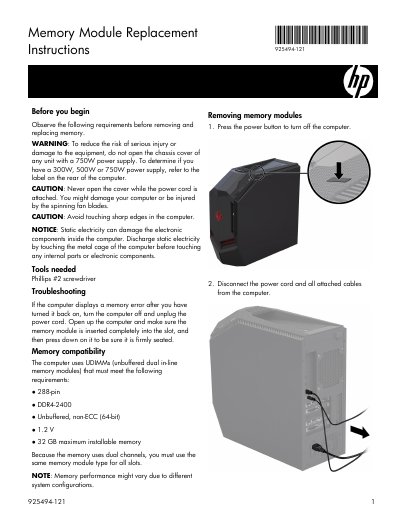
This document provides step-by-step instructions for removing and replacing memory modules in an HP computer. It includes safety warnings, required tools, memory compatibility requirements, and troubleshooting guidance.
The instructions cover opening the access panel, removing existing modules, installing replacement modules, and reassembling the computer. The memory requirements include 288-pin DDR4-2400 unbuffered non-ECC modules at 1.2 V, with a maximum installable memory of 32 GB.
| Memory pin count | 288-pin |
|---|---|
| Memory type | DDR4-2400 |
| Memory buffering and ECC | Unbuffered, non-ECC (64-bit) |
| Maximum installable memory | 32 GB |
Turn the computer off, unplug the power cord, open the computer, make sure the memory module is fully inserted into the slot, and press down to ensure it is firmly seated.
A Phillips #2 screwdriver is needed.
The computer uses 288-pin DDR4-2400 UDIMMs that are unbuffered, non-ECC (64-bit), 1.2 V, with a maximum installable memory of 32 GB.
Yes, do not open the chassis cover of any unit with a 750W power supply.