
Guide to adjusting the Herman Miller Aeron chair's seat height, arm angle and height, tilt tension, PostureFit SL, lumbar support, and footrest.
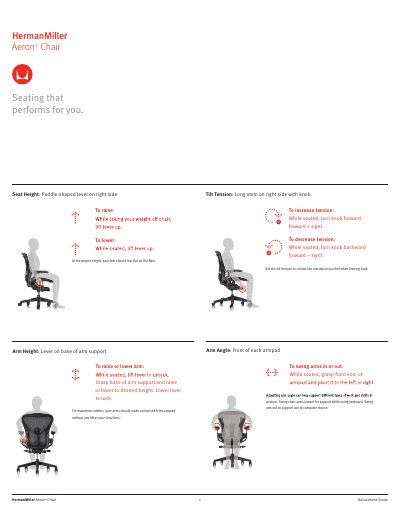
This guide explains how to adjust a Herman Miller Aeron chair. It covers seat height with a paddle-shaped lever on the right side, arm angle, arm height, arm depth, tilt tension, PostureFit SL, lumbar height, forward tilt, and the tilt limiter.
It also describes footrest height adjustment and notes that the footrest is only available on some models. The text advises setting the seat so the feet rest flat on the floor and the arms contact the arm pad without lifting the shoulders.
Use the paddle-shaped lever on the right side to raise or lower the seat.
Grasp the base of the arm support and raise or lower it to the desired height, then lower the lever to lock it.
It controls the resistance felt when leaning back; turn the knob forward to increase tension and backward to decrease it.
No, the footrest is only available on some models.