
The M-A2 controller manual explains features, setup, wiring, and operation for Greylight lighting controllers.
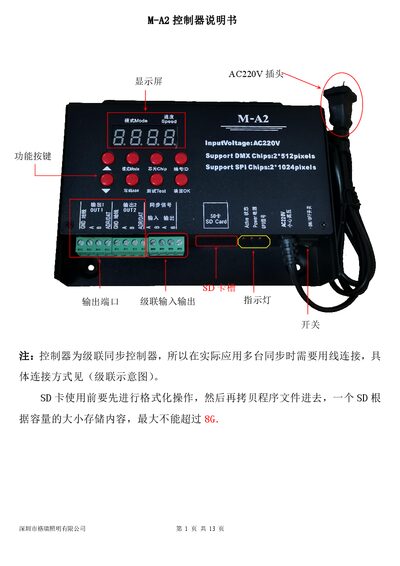
The M-A2 controller provides up to 65 536‑level grayscale control, supports a wide range of LED chips, and can be cascaded for synchronized operation. It runs on AC 220 V, stores programs on an SD card (≤8 GB) and offers both SD‑card and built‑in effect modes.
The manual details how to set the controller ID, select chip types, adjust brightness, run tests, switch modes, write DMX addresses, and connect multiple units via cascading or GPS sync. Safety and wiring guidelines are also included. This manual is written in Chinese.
| Supply voltage | AC220V |
|---|---|
| Load capacity | DMX2*512; TTL2*1024 points |
| Synchronization method | Cascading sync / GPS sync |
| Load method | SD card program |
| Dimensions | 160×127×40 mm |
| Weight | 0.9 kg |
| SD card capacity | ≤8 GB |
Check that the program file was copied correctly (the file must be named OFF001.arm), that the SD card is formatted to FAT32, and that the card’s write‑protect lock is not engaged.
Verify that the cascade cable is wired correctly with the proper input‑output direction, and ensure each controller’s ID number is set in sequential order.