
The Global Specialties GaK-409 Audio Control Switch manual provides specifications, assembly instructions, testing, and troubleshooting for the…
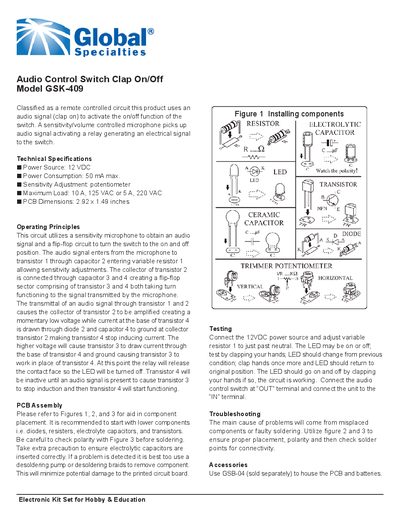
The GaK-409 is a remote‑controlled audio switch that uses a clap‑activated microphone to turn a relay on or off, allowing control of loads up to 10 A at 125 VAC (or 5 A at 220 VAC). The circuit employs a flip‑flop built from transistors and a potentiometer for sensitivity adjustment.
This manual details the technical specifications, operating principles, PCB assembly steps, testing procedure, and troubleshooting tips. It also lists component values and references an optional enclosure (GSB‑04) for hobby and educational use.
| Power Source | 12 VDC |
|---|---|
| Power Consumption | 50 mA max |
| Sensitivity Adjustment | potentiometer |
| Maximum Load | 10 A, 125 VAC or 5 A, 220 VAC |
| PCB Dimensions | 2.92 x 1.49 inches |
Clapping generates an audio signal that the microphone detects, triggering a flip‑flop circuit which drives the relay to change the switch state.
The switch can handle up to 10 A at 125 VAC or 5 A at 220 VAC.