
User manual for G-FORCE G0022 corner weight system, measuring vehicle weight distribution for racing.
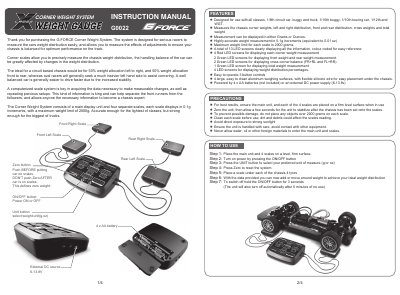
The G-FORCE G0022 Corner Weight System is designed for racers to measure precise weight distribution across four corners. It includes a main display and four scales, each with 0.1g precision and 2000g capacity. The system displays weight in grams or ounces and features color-coded LED screens for easy reading.
To use, place the unit and scales on a firm surface, power on, select units, zero the system, and place scales under each tire. Calibration is possible using a 2000g weight via the FL jack. The system runs on 4 AA batteries or an external 6-13.8V DC source. This manual is written in Chinese.
| Maximum weight per scale | 2000g |
|---|---|
| Tolerance | ±0.5g |
| Power source | 4 x AA batteries or external DC 6-13.8V |
| Main unit dimensions | 130.4 x 104.5 x 35.3mm |
| Scale dimensions | 59.1 x 65.1 x 17.5mm |
| Net weight | 354g (without batteries) |
Each scale has a maximum weight limit of 2000 grams.
Turn on the scale, wait for “000.0”, press and hold UNIT for 3 seconds until “CAL” appears, then press UNIT again to display “CAL” followed by 2000g. Add the 2000g weight and the display will show “PASS”.
The system can display weight in grams or ounces.
Press and hold the ZERO button for more than five seconds, then press ZERO repeatedly to adjust brightness. Wait 8 seconds after choosing the desired brightness to save the setting.