
User manual for the FV FV-toyota interface box, covering installation, DIP switch settings, side buttons, extra control ports, infrared learning, and…
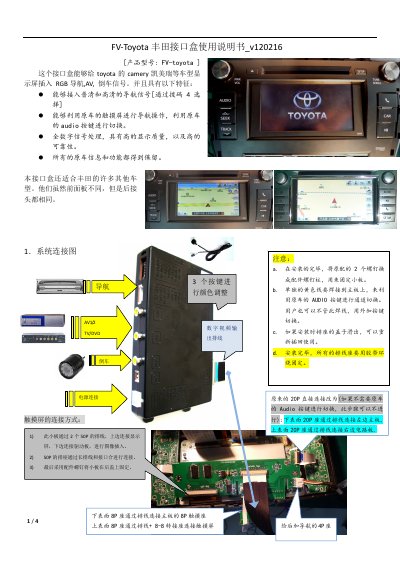
The FV-toyota interface box lets Toyota Camry and other Toyota models add RGB navigation, AV, and reverse camera signals to the factory display while retaining all original car information and functions. It supports standard and high-definition navigation signals selected through DIP switch 4.
The document provides system connection diagrams, DIP switch settings, side button instructions, 6P input signal definitions, an extra 8-pin control port for touchscreen and infrared code learning, and technical parameters including video amplitude, power consumption, standby current, trigger level, and operating temperature. This manual is written in Chinese.
| Video amplitude | 0.7Vpp with 75 Ω impedance |
|---|---|
| Sync signal strength | 3~5Vpp with 5K impedance |
| RGB resolution | SD: NTSC 240/234 lines, 320/400/480 pixels; HD: 800X480 |
| Video format | NTSC/PAL/SECAM auto switching |
| Normal power consumption | 2.4W [0.2A @12V] |
Set DIP switch 4 to ON; the unit recommends 800X480 resolution.
It is the reverse signal line; at 12V during reverse it switches to reverse mode.
Select AV1 input, lower DIP switch 6 once, point the remote at the IR input port, and press once.
Yes, all original car information and functions are retained.