
The Fluke DSP4000 digital test instrument user manual provides setup, operation, testing functions, battery status, and self‑calibration instructions.
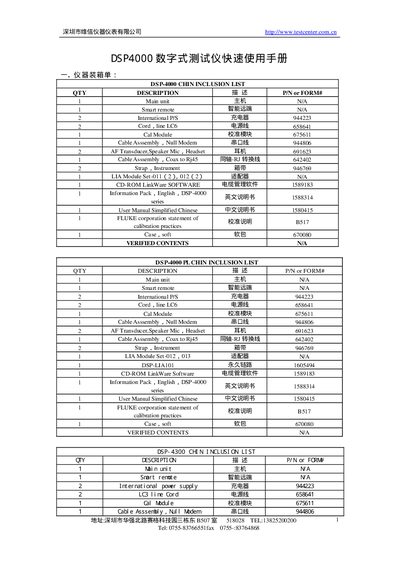
This manual describes the DSP4000 digital test instrument, listing all supplied items such as the main unit, smart remote, cables, transducers, and software CD. It also details the connection options, including RS‑232C DB9P and Ethernet (Coax to RJ45) interfaces.
The document explains how to navigate the instrument’s menu system, covering functions like AUTO TEST, SINGLE TEST, SELF CALIBRATION, and SPECIAL FUNCTIONS. It provides information on viewing battery status, LIA status, and version information, as well as instructions for saving, printing, and deleting test reports. This manual is written in Chinese.
| RS‑232C connector type | DB9P |
|---|---|
| Coax to RJ45 cable | Provided |
| Serial port baud rate | Configurable |
Select SINGLE TEST from the menu to run a single test.
Battery status is displayed under the BATTERY STATUS menu.
Choose SELF CALIBRATION from the menu to run the self‑calibration routine.