
Quick reference guide for installing and using the First Data FD130 payment terminal, including cable setup, paper roll installation, and common transactions.
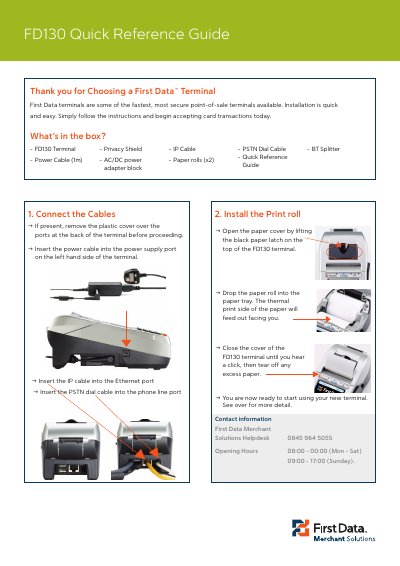
The First Data FD130 Quick Reference Guide covers unpacking, cable connection, paper roll installation, and contact information for the FD130 payment terminal. It also outlines common transactions such as chip and PIN sales, refunds, contactless sales, reconciliation, and reports.
The guide states that contactless transactions have a maximum limit of £20.00 and that cash back is not permitted in contactless transactions.
| Power cable length | 1 m |
|---|---|
| Contactless transaction maximum | £20.00 |
| Cash back in contactless transactions | Not permitted |
Open the paper cover, drop the paper roll into the paper tray with the thermal print side facing you, close the cover until it clicks, and tear off excess paper.
Contactless transactions have a maximum limit of £20.00.
No, cash back is not permitted in contactless transactions.
08:00 to 00:00 Monday to Saturday and 09:00 to 17:00 Sunday.