
EMAX Magnum Mini F4 3SA manual covering flight controller specs, VTX setup, firmware flashing, driver installation, and receiver configuration.
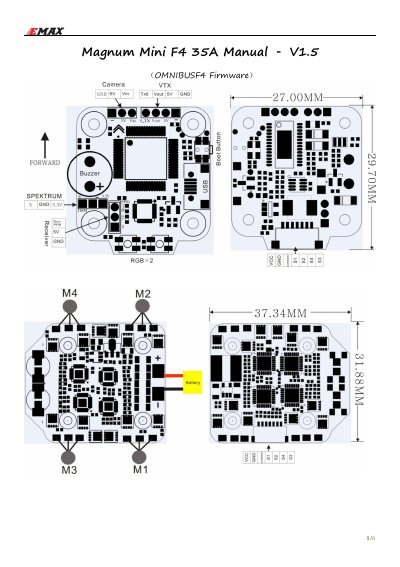
This manual covers the EMAX Magnum Mini F4 3SA flight controller and its 4-in-1 ESC, including board specifications, wiring, and the VTX module. It provides instructions for configuring the video transmitter through the Betaflight OSD, flashing OMNIBUSF4 firmware over DFU/USB, installing Zadig and STM32 VCP drivers, and setting up Spektrum serial receivers.
The document also includes the VTX button menu, frequency group and channel charts for CE/FCC and HAM-licensed users, and notes that the VTX supports 25 mW and 200 mW power levels.
| Total weight | 17.21 g |
|---|---|
| Flight controller MCU | STM32F405 |
| Accelerometer/gyro | MPU6000 connected via SPI |
| ESC MCU | STM32F051K6U6 |
| ESC firmware | BLHeli_32, supports DSHOT, MULTISHOT, ONESHOT125 |
| ESC continuous current | 35 A (max burst 40 A) |
| Supply voltage | 2-6S LiPo (1700kv motor limit for 6S) |
| Flight controller board size | 30 x 27 mm with 20 mm mounting holes |
| ESC board size | 32 x 37 mm with 20 mm mounting holes |
| Integrated BEC | 5V / 3A |
| VTX frequency band | 5658-5945 MHz (FCC compliant channels / with HAM unlock) |
| VTX channel | 37 |
| VTX transmit power | 13 dBm / 23 dBm (25 mW / 200 mW) |
| VTX supply voltage | 4.5 V - 5.5 V |
| VTX audio control | TBS Audio Control |
| Firmware upload method | DFU, USB - Windows |
Press and hold the 5S button to enter the menu, then press and hold 5S again to save parameters and exit.
Under normal display, double click the button to turn off the power output.
Place the board into DFU mode with the boot button, then use Zadig to select the STM DFU or STM BOOTLOADER device and install the WinUSB driver.
Select "Serial based receiver" in Receiver Mode and choose "Spektrum2048" as the Serial Receiver Provider.