
dresden elektronik deRFdevelopmentKit ZigBee Light Link 2.4 GHz Quick Start Guide

Quick Start Guide for the dresden elektronik deRFdevelopmentKit ZigBee Light Link 2.4 GHz residential lighting application.
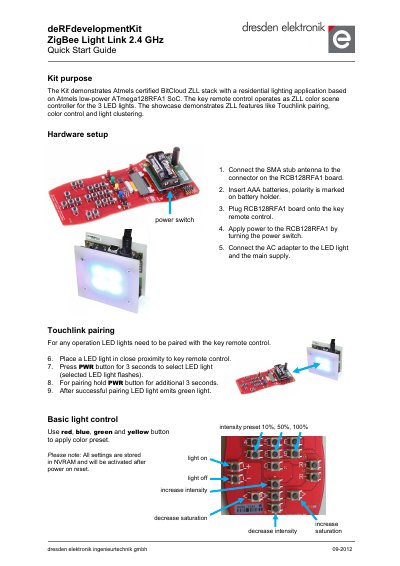

dresden elektronik deRFdevelopmentKit ZigBee Light Link 2.4 GHz Quick Start Guide - cover page
Brand
dresden elektronik
Category
Other Electronics
Document type
Quick Start Guide
Language
English
Pages
2
File format
PDF
File size
407 KB
Published
16 November, 2026
Updated
16 November, 2026
MD5 checksum
5BC7579B95BEAD4079C32E0B24B3BFB5

About this manual

The deRFdevelopmentKit ZigBee Light Link 2.4 GHz is a development kit that demonstrates the Atmel certified BitCloud ZLL stack. It is based on the low-power ATmega128RFA1 SoC and is designed for residential lighting applications.

The kit includes a ZLL color scene controller used to manage three LED lights, showcasing features such as Touch link pairing, color control, and light clustering.

What's inside

  • Kit purpose
  • Hardware setup
  • Touch link pairing
  • Basic light control
  • Add more lights
  • Identify LED lights
  • Light scenes
  • Reset LED light to factory new state
  • Reset key remote control to factory new state

Specifications

SoCATmega128RFA1
Frequency2.4 GHz

Frequently asked questions

How long do you press the PWR button to select an LED light for pairing?

Press the PWR button for 3 seconds to select the LED light; the selected LED light flashes.

What indicates that an LED light was successfully paired with the key remote control?

After successful pairing, the LED light emits green light.

How many light scenes can be stored on the key remote control?

Up to 3 individual light setups can be stored or recalled on light scene buttons 1, 2 and 3.

How do you reset an LED light to factory new state?

Press and hold the PWR, R+ and R- buttons for more than 3 seconds; the LED light turns on all lights and then powers down.

Download PDF (407 KB)

More dresden elektronik Manuals


View all dresden elektronik manuals →