
User manual for the Dizhi Wenyuange Siku Quanshu Electronic Edition intranet client program, covering startup, login, search, viewing, updates and support.
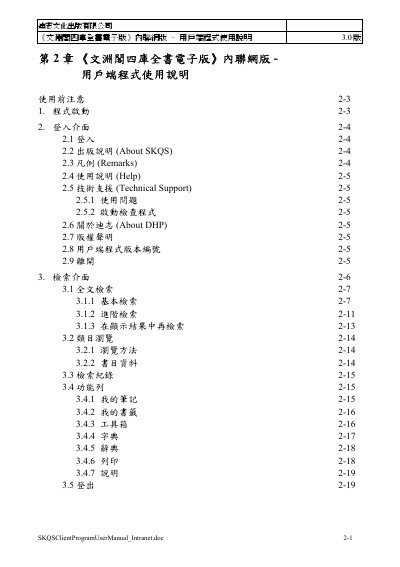
This 3.0 user manual covers the intranet client program for the Wenyuange Siku Quanshu Electronic Edition from Dizhi Culture Publishing. It describes the minimum computer requirements, program startup, login, search, and viewing original text and images.
The manual explains full-text search, category browsing, reading tools such as page turning, marking, copying and printing, as well as program and data updates and technical support for login, printing and text display problems. This manual is written in Chinese.
| Minimum CPU | Pentium III 800 or equivalent |
|---|---|
| Minimum RAM | 256 MB or more |
| Minimum disk space | 140 MB or more |
| Display | 1024 x 768 resolution and 32768 (15-bit) colors or higher |
| Operating system | Microsoft Windows XP Traditional Chinese, Simplified Chinese, English, Japanese and Korean versions, updated to Service Pack 2 |
| Browser | Microsoft Internet Explorer 6.0 or later |
| .NET Framework | Microsoft Windows .NET Framework 2.0 |
A user name and password are required when logging in with an account.
Yes, authorized IP address is one of the two login methods described.
No; added punctuation, notes, bookmarks and search records are not retained after logout.
It checks whether the client program is properly installed, including fonts and function operation.