
This manual provides installation, usage, troubleshooting, and maintenance instructions for the Dell Dimension 3100/E310 desktop computer.
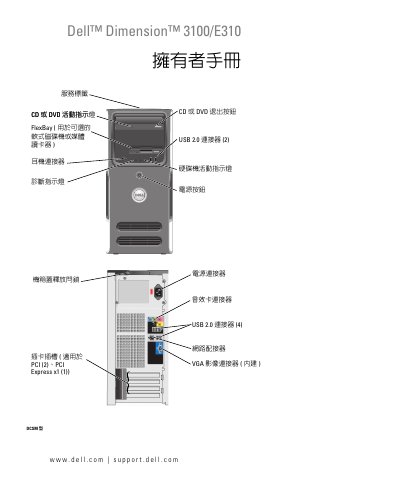
This document serves as the Owner's Manual for the Dell Dimension 3100/E310 desktop computer. It covers essential topics including hardware installation, system setup, network configuration, and maintenance procedures. The guide is designed to help users effectively utilize their computer and resolve common issues. This manual is written in Chinese.
| Processor | Intel Pentium M |
|---|---|
| Memory | DDR2 |
| USB Ports | 2.0 |
| Optical Drive | CD or DVD |
You can find support information on the Dell support website at support.dell.com.
Refer to the 'Troubleshooting' section for solutions to issues where the computer stops responding.
You can clear a forgotten password by following the instructions in the 'Clear Forgotten Password' section.