
Dell Computer First Use Guide

This multilingual Dell computer setup guide explains how to connect a monitor, keyboard, mouse, modem, and network cable, and turn on the system.
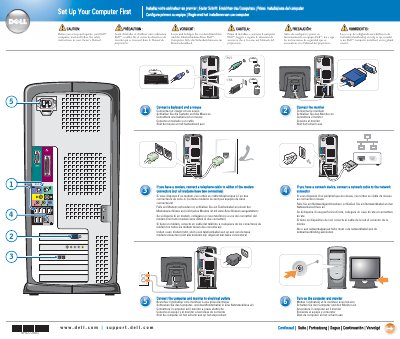

Dell Computer First Use Guide - cover page
Brand
DELL
Document type
Quick Start Guide
Language
English
Pages
2
File format
PDF
File size
761 KB
Published
23 November, 2026
Updated
23 November, 2026
MD5 checksum
039A44D05559ACF41E2A962F821D7C1D

About this manual

This document is a multilingual first-use and setup guide for Dell™ computers, published by Dell Computer Corporation in June 2003. It provides safety cautions and basic installation steps before operating the computer.

It covers connecting the monitor, keyboard, mouse, modem telephone cable, and network cable, plugging the computer and monitor into electrical outlets, and turning the system on. It also refers users to the Owner’s Manual and Dell support resources such as support.dell.com and the Dell Solution Center.

What's inside

  • Set Up Your Computer First
  • Connect the monitor
  • Connect a keyboard and a mouse
  • Connect the computer and monitor to electrical outlets
  • Turn on the computer and monitor
  • Connect a network cable to the network connector
  • Connect your speakers to the optional sound card connectors
  • Help and Support
  • Dell Solution Center and support.dell.com
  • Owner’s Manual

Frequently asked questions

What should you do before setting up and operating a Dell computer?

Read and follow the safety instructions in the Owner’s Manual.

Where can you find additional setup instructions, including how to connect a printer?

See the Owner’s Manual for more information.

How can you access Dell support and educational tools?

Double-click the Dell Solution Center icon on the Windows desktop or visit support.dell.com.

Download PDF (761 KB)

More DELL Manuals


View all DELL manuals →