
Butler Technik vehicle heaters technical documentation covers service functions, fault memory, workshop menus, settings, and display tests.
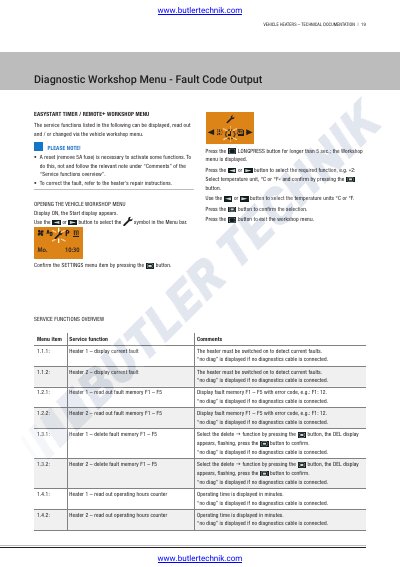
This Butler Technik technical documentation covers 19 service functions for Vehicle Heaters, including current fault display, fault memory F1–F5, deleting fault memory, and operating hours counters. It notes that current faults require the heater to be switched on and that “no diag” appears when no diagnostics cable is connected.
The document describes the EasyStart Timer / Remote + and EasyStart Select vehicle workshop menus, including settings for temperature unit, undervoltage limits, operating time, language, automatic operating time calculation, engine size, add-on units, KL58/KL15 mode, display pixels, and display contrast.
| Fault memory positions | F1–F5, with error code. |
|---|---|
| Undervoltage limit (EasyStart Timer only) | Default 8 V; 8–28 V in 0.1 V increments. |
| Fault detection debounce time (EasyStart Timer only) | Default 20 seconds; 5–255 seconds in 1-second increments. |
| Heater 1 maximum operating time (EasyStart Timer only) | Default 120 min; 10–120 min in 1-min increments, then to 720 min in 5-min increments. |
| EasyStart Remote + check measurement | R and S should be between 75 and 100. |
| Engine size setting | Default 1800 cm³; 1000–4000 cm³ in 100 cm³ increments. |
| Automatic operating time maximum | Default 60 min; 10–60 min in 1-min increments. |
| KL15 afterrun time | Default 15 min; 1–255 min; 0 means continuous operation. |
With the Start display shown, confirm SETTINGS, then press the LONGPRESS button for longer than 5 sec.; the Workshop menu is displayed.
It is displayed when no diagnostics cable is connected.
Select the delete J function by pressing the button; when DEL flashes, press the button to confirm.
R and S should show a value between 75 and 100; the measurement is ok in that range.