
Guide to setting up and using the BlueSky Designs Pow!r Mount'n Mover Hybrid powered wheelchair mount.
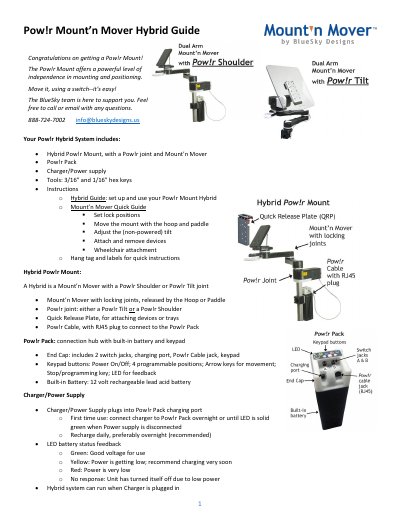
This guide explains setup and use of the BlueSky Designs Pow!r Mount'n Mover Hybrid system, including charging and connecting the Pow!r Pack, keypad and switch control, joint release, back-off force, mounting side, pinch hazards, and attachment options.
It also covers Pow!r Shoulder and Pow!r Tilt considerations, programmable and target positions, and cable management.
| Battery | 12 volt rechargeable lead acid battery |
|---|---|
| Charging | Overnight or until LED is solid green |
| Programmable positions | 4 |
| Switch jacks | 2 |
| Tools | 3/16 inch and 1/16 inch hex keys |
| Back-off force settings | 1 lightest to 4 strongest; default 3 |
| Mounting side default | Left-side mount |
| Target positions | Positions 1 and 2 |
Plug the charger into a powered outlet and the charger barrel into the Pow!r Pack; recharge daily, preferably overnight.
Push in on the back end of the yellow button and slide it toward the end of the joint; push in and slide it back to re-engage.
Green means good voltage for use, yellow means power is getting low, red means power is very low, and no response means the unit turned itself off due to low power.
Press and hold the Stop button and the Right arrow key until the LED blinks blue, then release.