
The Benshi AP-1 handheld radio user manual provides operating instructions, feature descriptions, and technical specifications.
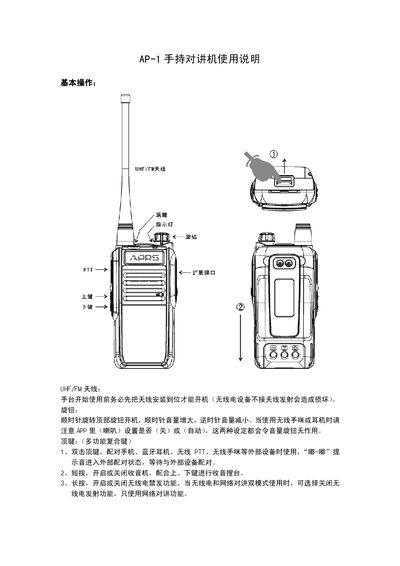
This manual explains how to operate the Benshi AP-1 handheld radio, covering basic controls such as the power knob, volume knob, top multifunction key, and channel navigation keys. It also details the use of the built‑in antenna, indicator lights, battery installation, and the external interface for GPS/Beidou modules.
The guide describes how to pair the radio with the Benshi app, connect external devices like Bluetooth headsets or PTT units, and use the dual‑mode (radio and network) communication features. Separate sections address specific use cases for cycling, HAM radio, and outdoor activities, and a full technical specifications table lists frequency ranges, power output, battery capacity, dimensions, and performance metrics. This manual is written in Chinese.
| Frequency range | FM 88‑108 MHz (receive), UHF 400‑470 MHz (transmit/receive) |
|---|---|
| Number of channels | 16 × N channels |
| Power supply | 3.7 V Li‑ion battery |
| Battery capacity | 5200 mAh |
| Dimensions (W×H×D) | 58 mm × 125 mm × 35 mm (without antenna) |
| Weight | Body 140 g, Battery 120 g |
| Output power | 4 W |
| Sensitivity (12 dB SINAD) | ≤0.20 µV (wideband), ≤0.22 µV (narrowband) |
Rotate the top knob clockwise to power on the device.
Pull down the safety latch (illustration 1) and then push the battery downwards to release it (illustration 2).