
The Beacon Global Tech BT-MT-MB Gateway manual describes its Modbus TCP/Serial communication features, specifications, and configuration options.
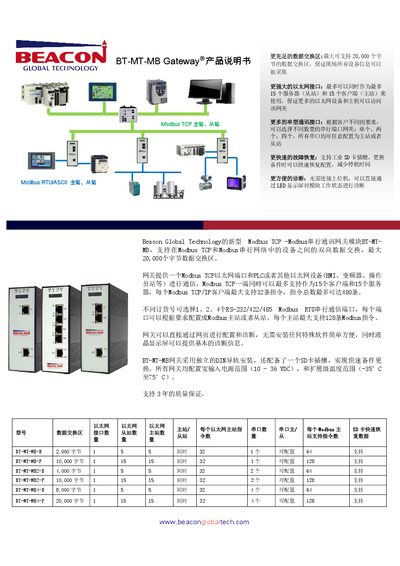
The BT-MT-MB series gateway from Beacon Global Tech provides bidirectional data exchange between Modbus TCP and Modbus serial networks, supporting up to 20,000‑byte data exchange areas. It offers flexible Ethernet and serial port configurations, with up to 15 Ethernet servers and 15 clients, and selectable 1, 2, or 4 RS‑232/422/485 ports that can be set as master or slave.
The device includes an OLED display for on‑site diagnostics, an industrial‑grade SD‑card slot for rapid configuration recovery, and a wide input voltage range (10‑36 VDC). Hardware specifications such as dimensions, weight, and environmental ratings are provided, along with a full Modbus command list and web‑based configuration interface. This manual is written in Chinese.
| Ethernet ports (servers/clients) | Up to 15 servers and 15 clients simultaneously |
|---|---|
| Serial ports per model | 1, 2, or 4 ports depending on model |
| Input voltage range | 10 VDC – 36 VDC |
| Operating temperature | -35 °C to 75 °C |
| Dimensions (W×D×H) | 2.13 × 4.18 × 5.72 inches (54.2 × 106.1 × 145.4 mm) |
| Weight | 600 g |
| OLED display resolution | 128 × 32 pixels |
It can support up to 15 Ethernet servers (slaves) and 15 Ethernet clients (masters) simultaneously.
The gateway operates with an input voltage between 10 VDC and 36 VDC.
Yes, the gateway can be configured and diagnosed directly via a web page without any special software.