
This quick installation guide shows how to set up a barcode printer, covering hardware assembly, sensor calibration, and initialization.
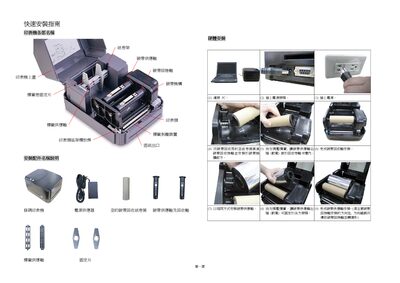
The guide provides step‑by‑step hardware installation instructions, including connecting the printer to a PC, attaching the power supply, and installing the carbon ribbon and label roll. It also explains how to load the ribbon, secure the label roll, and adjust the paper guide.
Additional sections describe the printer's power‑on functions, self‑test mode, gap‑sensor sensitivity calibration, and how to perform a full printer initialization to restore factory settings. This manual is written in Chinese.