
User manual for B. Braun's Stimuplex® HNS 12 nerve stimulation device, covering settings, operation, and safety.
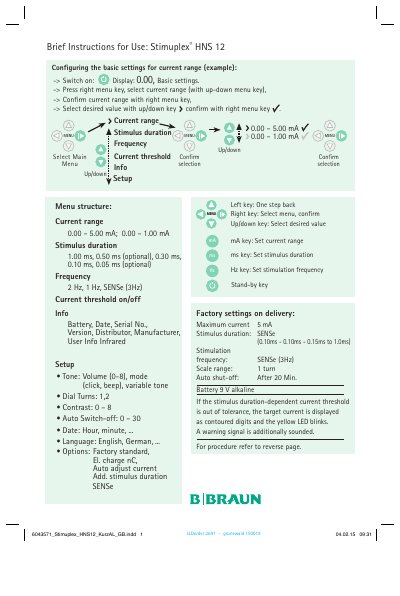
This manual provides step-by-step instructions for operating the Stimuplex® HNS 12 nerve stimulation device. It details how to configure current range, stimulus duration, frequency, and other settings using the device’s menu system. The guide also explains how to apply electrodes, adjust stimulation parameters during use, and safely switch the device on and off. Safety warnings are included for improper use or high impedance.
The device uses a 9V alkaline battery and features infrared setup options including tone, contrast, and auto-switch-off. It is intended for medical use under physician supervision and includes warnings for potential risks during stimulation procedures.
| Current Range | 0.00 – 5.00 mA; 0.00 – 1.00 mA |
|---|---|
| Stimulus Duration | 1.00 ms, 0.50 ms (optional), 0.30 ms, 0.10 ms, 0.05 ms (optional) |
| Frequency | 2 Hz, 1 Hz, SENSe (3Hz) |
| Battery | 9 V alkaline |
Press the right menu key to select current range, use up/down keys to choose value, then confirm with the right menu key.
Available durations are 1.00 ms, 0.50 ms (optional), 0.30 ms, 0.10 ms, and 0.05 ms (optional).
The target current is displayed as contoured digits and the yellow LED blinks, with an additional warning sound.
Hold down the key for 1 second to switch off; the last basic menu settings are reactivated.