
APSU guide for making video, Word, PowerPoint, Excel, PDFs, equations and surveys accessible, with checks and contact details.
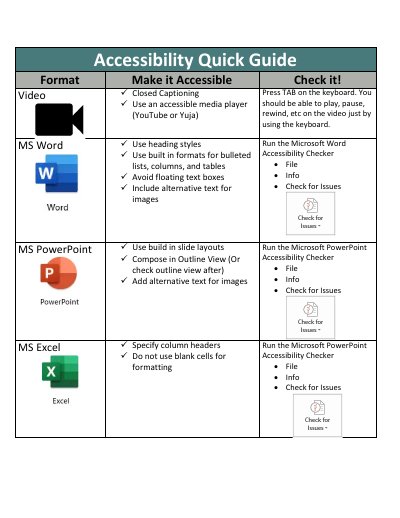
The APSU Accessibility Quick Guide is a two-page reference for making common digital formats accessible. It covers closed captioning and keyboard checks for video; heading styles, built-in formats, alternative text and the Accessibility Checker in Microsoft Word; slide layouts, Outline View and alternative text in PowerPoint; and column headers and blank-cell practices in Excel.
For PDFs, it recommends using software that creates accessible PDFs, saving as PDF and running OCR on scanned items in Adobe Acrobat Pro. It also covers MathType and D2L’s equation editor for equations, Qualtrics for surveys, and lists additional resources plus APSU Distance Education contact details.
Press TAB on the keyboard; you should be able to play, pause, rewind and use other controls without a mouse.
Use the MathType plugin for MS Word, or D2L’s equation editor, which publishes equations in an accessible format.
Use Qualtrics for point-and-click form creation; the guide notes that Qualtrics is mostly accessible.
Contact APSU Distance Education at [email protected] or 931-221-6621.