
Apantac DA-HDTV-SDI user manual: installation, troubleshooting Q&A, supported HDMI/SDI formats, pinout, features and specifications.
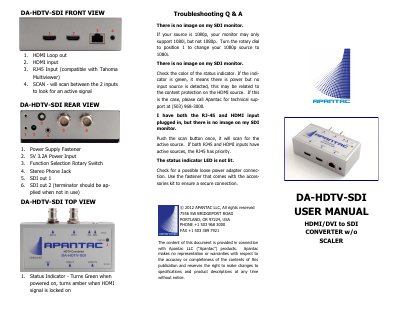
This user manual covers the Apantac DA-HDTV-SDI, an HDMI/DVI to SDI converter without a scaler. It starts with a troubleshooting Q&A section about missing images on the SDI monitor, source priority between the RJ45 and HDMI inputs, and a status indicator that is not lit, then labels the rear, top and front views of the unit (HDMI loop out, HDMI input, RJ45 input, SCAN button, power input, function selection rotary switch, stereo phone jack, SDI out 1 and SDI out 2, and the status indicator).
The installation section gives four connection steps and explains how to use the internal test signals and the rotary switch position 1 to turn a 1080p input into a 1080i output. A table lists the supported HDMI input and SDI output formats, followed by an HDMI pinout table, a feature list, the package contents and accessories, and a specifications table.
| Input | 1 x HDMI, 1 x RJ45 (HDMI) |
|---|---|
| Output | 2 x SDI, 1 Stereo Audio Phone Jack |
| Maximum resolution / distance | HD-SDI up to 140 m, 3G up to 120 m |
| Adjustments | Rotary dial for interlacing and internal color bars |
| Power | 5V 3.2A |
| Dimensions | 62 W x 112 D x 35 H (mm) |
Set the rotary switch to position 1 to change the 1080p source to a 1080i output.
Press the SCAN button once to scan for the active source; if both are active, the RJ45 input has priority.
Green means there is power but no input source is detected, which may be related to content protection on the HDMI source.
Check for a possible loose power adapter connection and use the supplied fastener for a secure connection.