
The ALive ALiveNF7G-HD720P/ALiveNF7G-HDready motherboard user manual explains HDMI setup, BIOS options, and USB performance tweaks.
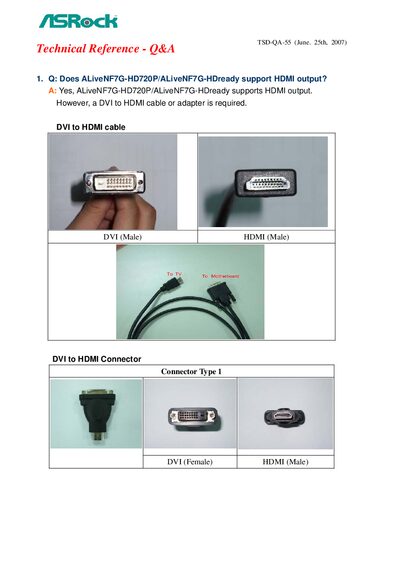
This technical reference Q&A manual provides guidance for the ALiveNF7G-HD720P/ALiveNF7G-HDready motherboard. It covers HDMI output support, required adapters, BIOS configuration, and USB speed optimization.
Key sections include instructions for enabling HDMI audio in the BIOS, selecting the correct digital audio output in Windows Vista, and applying a registry tweak to improve USB HDD performance.
| HDMI output support | Yes |
|---|---|
| Onboard HDMI HD Audio setting | Auto |
| USB BIOS registry key USBBIOSx default | 0x00000000 |
Yes, it supports HDMI output but requires a DVI‑to‑HDMI cable or adapter.
Edit the registry to set USBBIOSx to 0, save as USB.reg, run the file, and reboot the system.