
Quick start guide for the AirCheck 52 pump covering setup, calibration, sampling, charging, and troubleshooting.
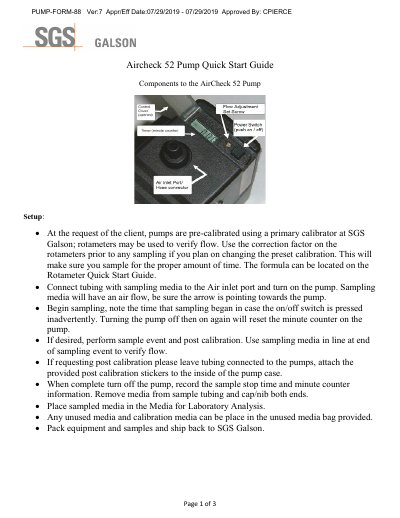
The AirCheck 52 Pump Quick Start Guide provides instructions for setting up, calibrating, and operating the pump for air sampling. It includes steps for connecting tubing, starting sampling, performing post-calibration, and returning samples to SGS Galson.
The guide also covers low-flow applications, charging procedures for PowerFlex 5 Station and SKC Single Station chargers, and troubleshooting for flow faults and battery issues. It notes the pump's flow range of 1–2.5 L/min for high-flow models and a fixed 1.5 L/min for low-flow setups.
| Flow range (high flow) | 1 to 2.5 L/min |
|---|---|
| Low flow setting | 1.5 L/min |
| Charger input voltage | 100 to 200 volts |
| Charger indicator lights | Red = charging, Green = charge complete |
A broken arrow indicates a flow fault, which can be caused by kinked tubing, clogged filter, overloaded media, loose hose connector, or worn gasket.
Recharge the battery; if the pump stops when the battery is moved, remove and reattach the battery, tightening the screws. If it still won't start, contact SGS Galson at 1-888-432-5227.
Plug the power supply into the back of the PowerFlex, then the adapter end into the transformer, then plug into the pump(s), then plug the power cord into a 100–200 volt outlet.
High flow pumps are built to sample from 1 L/min to 2.5 L/min depending on the filter media in line.