
This user manual covers the setup, operation, and maintenance of the AfterShokz Aeropex AS800 bone conduction headphones, including charging, pairing, and…
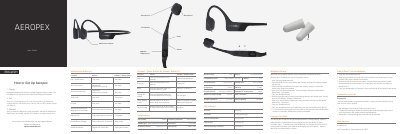
This document provides instructions for the AfterShokz Aeropex AS800 bone conduction headphones. It details how to charge the device using the magnetic cable, enter pairing mode, and connect to Bluetooth-enabled devices. The manual also explains the functions of the multifunction button for controlling music and calls, as well as adjusting volume and EQ settings.
| Speaker type | Bone conduction transducer |
|---|---|
| Frequency response | 20Hz~20KHz |
| Bluetooth version | Bluetooth v5.0 |
| Battery capacity | 145 mAh |
| Weight | 26 g |
| Water resistance | IP67 |
| Warranty | 2 years |
The LED indicator will turn from red to blue when charging is complete.
Start with your headphones off, then press and hold volume+ until Audrey says “pairing” and the LED indicator flashes red and blue.
It indicates that the device is in pairing mode.
Press and hold the multifunction button, volume+ button, and volume- button simultaneously for 3-5 seconds until you hear two beeps or feel vibrations.