
MYRYAD MXI 2080 User Manual, introduces the features and usage of MXI 2080
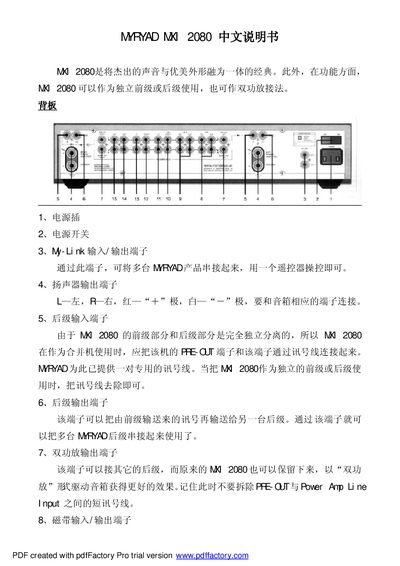
The Myryad MXI 2080 is described as a classic audio device that can be used as an independent preamplifier, power amplifier, or integrated amplifier, including bi-amp operation. The manual explains rear-panel terminals such as power, My-Link, speaker outputs, preamp and power-amp inputs and outputs, bi-amp output, and tape inputs and outputs.
Front-panel controls include standby, infrared receiver, display, volume knob, source selector, and tape monitor. Volume adjusts in 0.5 dB steps, and the first power-on volume level is set to -20 dB. This manual is written in Chinese.
| Volume adjustment precision | 0.5 dB per step |
|---|---|
| Default volume level | -20 dB |
Connect the unit's PRE-OUT terminal to the power amplifier line input terminal with the supplied signal cable.
On first power-on the volume is set to -20 dB.
Red indicates standby and blue indicates operating status.
Connect another power amplifier to the bi-amp output terminal and keep the short signal cable between PRE-OUT and Power Amp Line Input in place.