
Installation and parts information for the Dell Latitude E5410 and E5510 notebook computers
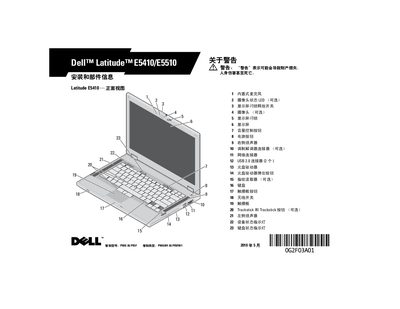
This manual covers the front and back views of the Latitude E5410 and E5510 notebooks, showing ports, indicators, and optional components such as fingerprint readers and cameras. It includes detailed installation instructions, warnings about ventilation blockage, and guidance for connecting peripherals and the AC adapter.
Technical specifications are listed, including processor options, memory configurations, battery types, and physical dimensions. The document also points users to Dell's regulatory compliance website for additional safety, warranty, and support resources. This manual is written in Chinese.
| Processor type | Intel Core i3, i5, i7 series |
|---|---|
| Memory type | DDR3 1333 MHz SDRAM (1066 MHz operation) |
| Maximum memory | 8 GB |
| Battery type | 4, 6 or 9‑cell smart lithium battery |
| AC adapter input voltage | 100 VAC–240 VAC |
| AC adapter output power | 65 W or 90 W |
| Height (E5410) | 33.2 mm (1.31 in) |
| Weight (E5410) | 2.39 kg (5.27 lb) |
The manual warns not to block ventilation holes or let dust accumulate, and to avoid operating the computer in poorly ventilated environments because blockage can cause damage or fire.
When disconnecting the AC adapter, hold the connector itself—not the cable—and pull gently to avoid damaging the cable.