
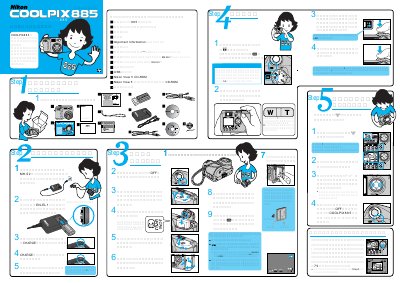
This is the Japanese quick start guide (クイックスタートガイド) for the Nikon COOLPIX 885 digital camera. It lists the items supplied with the camera and walks through the first steps: charging the rechargeable battery EN-EL1 in the MH-52 battery charger, inserting the battery and a CompactFlash card, and switching the camera on.
The guide then explains shooting with the shutter button, using the zoom button, checking images on the LCD monitor, creating a small picture for e-mail or web pages, and viewing images on a Windows computer with the supplied Nikon View 5 CD-ROM, including the installation steps and supported Windows versions. This manual is written in Japanese.
| Supplied software | Nikon View 5 CD-ROM |
|---|---|
| Supported OS (Windows) | Windows XP Home Edition/Professional, Windows 2000 Professional, Windows Me, Windows 98 SE |
Yes. Before connecting the camera to the computer, Nikon View 5 must be installed.
The CHARGE lamp goes off when charging is complete.
Nikon View 5 must be installed before connecting the camera.