
The NI 9901 Desktop Mounting Kit allows for the desktop installation of CompactRIO and CompactDAQ chassis, suitable for 8-slot/4-slot chassis.
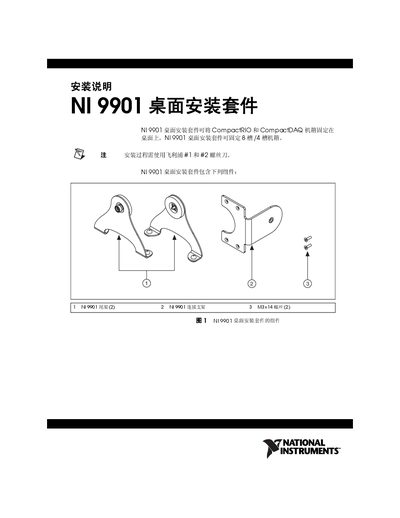
This guide explains how to install the NI 9901 module into compatible chassis, including CRIO-9151 R series and Compqc1DAG chassis. It provides step-by-step instructions for mounting brackets and securing the module using M3x14 screws and specific screwdrivers. Dimensions for installed configurations are also provided.
The guide includes environmental compliance information for RoHS and WEEE regulations, as well as technical support contacts for global regions. This manual is written in Japanese.
| Compatible Chassis | CRIO-9151 R series and Compqc1DAG |
|---|---|
| Mounting Brackets | 2 NI9901 補接支 and 3 M3x14 screws |
| Screw Type | M3x14 |
The NI 9901 can be mounted in CRIO-9151 R series and Compqc1DAG chassis.
Use screwdriver #1 to remove screws and screwdriver #2 to tighten screws.
Two mounting brackets and three M3x14 screws are included.