
This manual explains how to access, create an account, search, view details, download, and annotate e‑books on ProQuest Ebook Central.
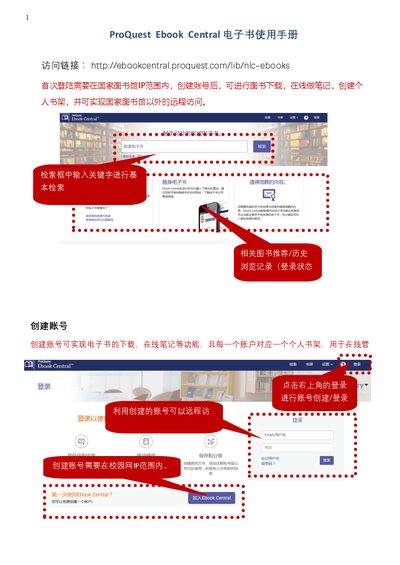
The guide starts with the access link and the requirement to log in from the library IP range for the first login. It then shows how to create an account, which enables e‑book download, online notes, and a personal bookshelf.
Next, it covers basic, advanced, and subject searches, how to interpret the results, view book details, and download either selected chapters/pages or the entire book (when available). It also explains online reading and note‑taking features, as well as the meaning of disabled download buttons. This manual is written in Chinese.
| Initial login requirement | Must be within library IP range |
|---|---|
| Download page limit | Cannot exceed quota |
Create an account to enable e‑book download, online notes, and a personal bookshelf.
Select the chapter or page range and click the download button; the file is saved as a PDF.
The button is grey when only one copy of the book exists, so a full download is not offered.