
3410 Timekeeping Mode User Manual

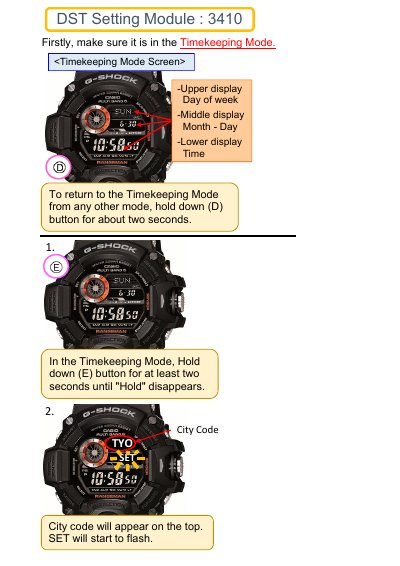
Instructions for entering the Timekeeping Mode, setting city codes, and configuring Daylight Saving Time (DST) settings.

3410 Timekeeping Mode User Manual - cover page
Brand
3410
Category
Other Electronics
Document type
User Manual
Language
English
Pages
2
File format
PDF
File size
279 KB
Published
08 November, 2026
Updated
08 November, 2026
MD5 checksum
1CA5CCE66B643C04FFA4C58A5EEAEA04

About this manual

This document provides operating instructions for the 3410 device, specifically focusing on the Timekeeping Mode. It details the steps required to return to this mode from other settings and how to configure the display.

What's inside

  • Timekeeping Mode
  • City Code Setting
  • DST Setting
  • Display Navigation

Frequently asked questions

How do I return to the Timekeeping Mode?

Hold down the (D) button for about two seconds.

How do I exit the City Code setting screen?

Press the (E) button twice.

Download PDF (279 KB)