
IBM System Storage DS4800 Storage Subsystem Installation and Cabling Overview
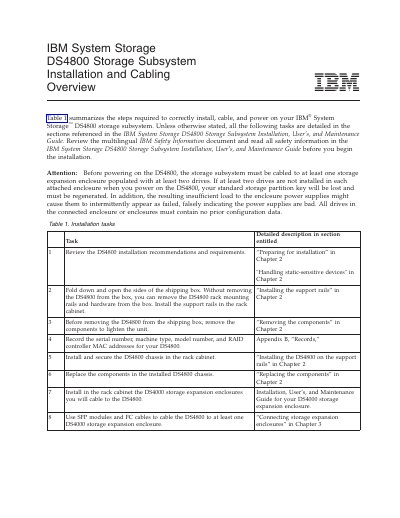
This eight-page IBM document summarizes the steps required to install, cable and power on the IBM System Storage DS4800 storage subsystem (machine types SV610000/SV620000/SV630000). A task table lists each installation step and points to the section of the IBM System Storage DS4800 Storage Subsystem Installation, User's, and Maintenance Guide where the detailed procedure is given, from preparing for installation and installing the support rails to connecting the power cables and turning on the storage subsystem.
The second part is a brief illustrated overview of the cabling tasks performed after the DS4800 is mounted in a rack cabinet: installing SFP modules and fibre channel cables, redundant drive-side cabling to DS4000 storage expansion enclosures such as the EXP710, storage expansion enclosure support and intermixing, and redundant host-side fibre channel cabling for up to four hosts. It also states the attention note that the subsystem must be cabled to at least one expansion enclosure holding at least two drives before power is applied.
| Maximum drives supported | 224 drives in two redundant drive channel pairs |
|---|---|
| Redundant host connections | Up to four hosts |
| Host software | IBM DS4000 Storage Manager 9.19 |
| Minimum cable requirement before power-on | At least one storage expansion enclosure with at least two drives |
| Fibre channel cable minimum bend | Not less than 76 mm (3 in.) diameter or 38 mm (1.5 in.) radius |
| Machine types | SV610000, SV620000, SV630000 |
Before powering on, the DS4800 must be cabled to at least one storage expansion enclosure populated with at least two drives, and those drives must contain no prior configuration data.
The DS4800 supports a maximum of 224 drives in two redundant drive channel pairs.
The DS4800 supports redundant connections to up to four hosts, using single-ported host channels on both RAID controllers A and B.
Remove the protective caps, insert the SFP module into a DS4800 controller port with minimal pressure, then connect the fibre channel cable to the SFP module.
The recommended topology uses ports from drive channel 1 on controller A and drive channel 3 on controller B.