
Tivoli® Netcool/Impact is a set of runnable server components that work together to provide event management and integration functionality for the Netcool® suite of products.
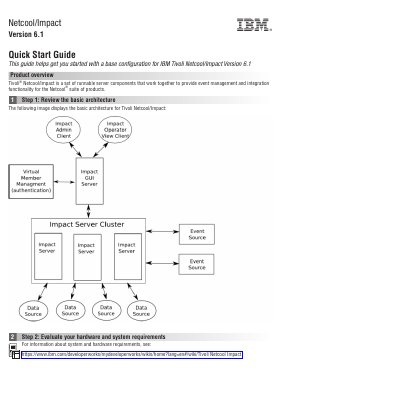
This quick start guide describes how to get a base configuration of IBM Tivoli Netcool/Impact Version 6.1 running. It introduces the product as a set of runnable server components that work together to provide event management and integration functionality for the Netcool suite of products, and walks through four steps: reviewing the basic architecture, evaluating hardware and system requirements, accessing the software, and reviewing the installation steps.
The guide explains that the software can be installed from two product DVDs or downloaded from the IBM Passport Advantage website, and that the installer automatically installs all software prerequisites, including the embedded version of IBM WebSphere Application Server. It compares Simple installation with Advanced installation, gives the order for installing the Impact Server and the GUI Server separately, and points to the Administration Guide, the online information center and the product support site for more information.
| Server components | Impact Server and GUI Server |
|---|---|
| Embedded application server | IBM WebSphere Application Server |
| Installation types | Simple installation and Advanced installation |
| Software delivery | Two product DVDs or download from Passport Advantage |
| Document part number | CF39PML |
Run the Tivoli Netcool/Impact installer in Advanced installation mode and keep the suggested default settings, then note all the settings the installer displays and store them for reference.
No. On UNIX systems the installer cannot be started under the root account; use a non-root user account that has read and write privileges on the installation directory.
Advanced installation is used to install Tivoli Netcool/Impact onto a production system; Simple installation is not recommended for production systems.
Use the Tivoli Netcool/Impact installer and, on Windows systems, start it under a user account with Administrator privileges.