
IBM Proventia Network Intrusion Prevention System Getting Started for GX4000 Series Appliances
IBM Proventia Network Intrusion Prevention System Getting Started for GX4000 Series Appliances explains how to connect the appliance, configure initial settings, connect to Proventia Manager, install the product license, and apply initial updates. It lists required cables and network information, describes LCD panel and serial console setup, and refers readers to the Installation Guide and Appliance User Guide for firmware-specific and advanced configuration details.
The guide also identifies appliance ports, covers port link and adapter mode configuration, and includes documentation and customer support contact information.
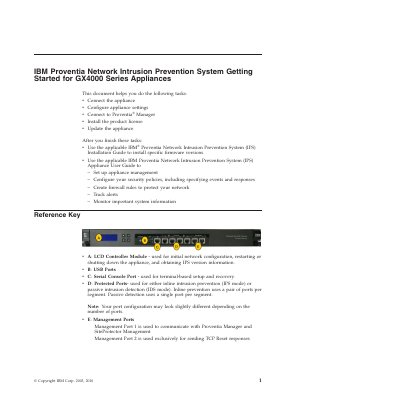
| Protected Ports | Used for inline IPS mode or passive IDS mode |
|---|---|
| Management Port 1 | Used to communicate with Proventia Manager and SiteProtector Management |
| Management Port 2 | RS Kill (TCP Reset) port used exclusively for TCP Reset responses |
| Serial Console Port | Used for terminal-based setup and recovery |
| LCD Controller Module | Used for initial network configuration, restarting or shutting down the appliance, and obtaining IPS version information |
| Serial Console Data Rate | 9600 bits per second |
| Serial Console Data Format | 8 data bits, no parity, 1 stop bit, no flow control |
| SFP Module Pairing | For each protected port pair, SFP modules must be the same media type |
Management Port 2 is the RS Kill (TCP Reset) port, used exclusively for sending TCP Reset responses.
Inline prevention uses a pair of protected ports per segment, while passive detection uses a single port per segment.
Select Auto to let the appliance negotiate speed and duplex mode with the network.
Proventia Manager is the web-based management interface for the appliance, used to monitor status, configure and manage settings, and review appliance activities.