
IBM Proventia Network Intrusion Prevention System Getting Started for GX5000 Series Appliances.
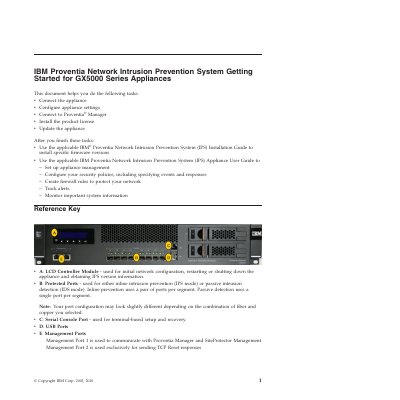
This getting started document covers the IBM Proventia Network Intrusion Prevention System for GX5000 Series appliances. It opens with a reference key for the appliance parts: the LCD controller module (A), the protected ports (B), the serial console port (C), the USB ports (D) and the management ports (E), where Management Port 1 communicates with Proventia Manager and SiteProtector and Management Port 2 is used for TCP Reset responses.
The guide then walks through the initial tasks: gathering the required cables and a PC with Internet Explorer, cabling and powering on the appliance, entering IP address, subnet mask and default gateway through the LCD panel or a serial console connection, and completing the initial configuration as admin (passwords, host and DNS settings, date and time, agent name, port link and adapter mode). It finishes with connecting to Proventia Manager over a secure browser session, installing the product license, applying firmware and intrusion prevention updates, and pointers to the Installation Guide and Appliance User Guide.
| Serial console communication port | Typically COM1 |
|---|---|
| Serial console emulation | VT100 |
| Serial console bits per second | 9600 |
| Serial console data bits | 8 |
| Serial console parity | None |
| Serial console stop bits | 1 |
| Serial console flow control | None |
| Management port 2 | TCP Reset port |
You need a power cable, the Proventia serial console cable (blue), an Ethernet crossover cable (red), Ethernet cables and a crossover adapter for each inline segment, and a PC with Internet Explorer and an Internet connection.
Use a communication port such as COM1, VT100 emulation, 9600 bits per second, 8 data bits, no parity, 1 stop bit and no flow control.
Start your web browser and type https://
Inline Protection Mode, Inline Simulation Mode and Passive Monitoring Mode. The adapter mode determines how the appliance behaves within the network in order to protect it.